
FaxFile - Send Fax from phone
Actual Software Inc.Business
4.96.16K Reviews
- Version
- Varies With Device
- Installs
- 500.00K
- Age Rating
- Everyone
Screenshots

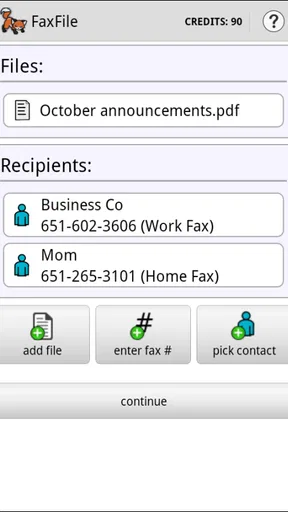
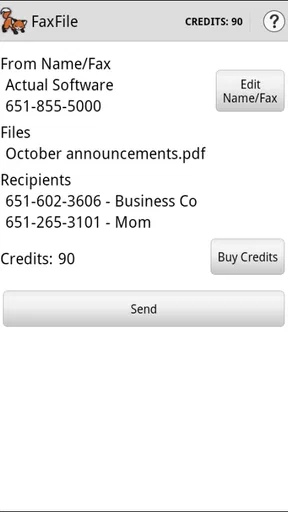
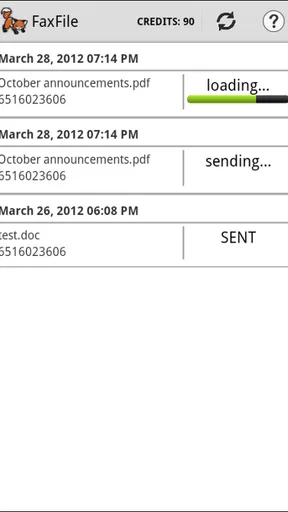
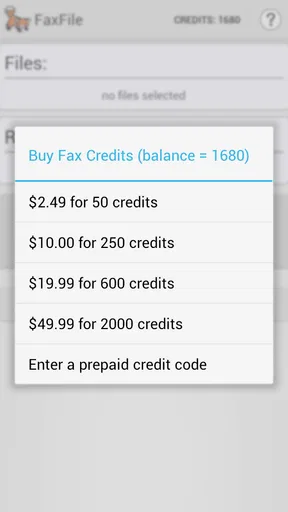

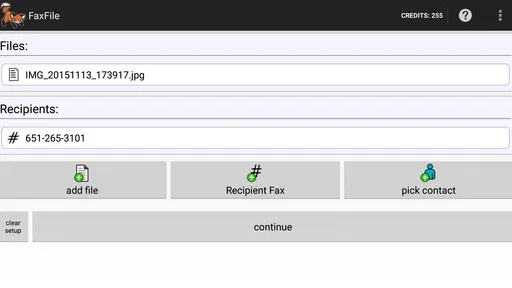
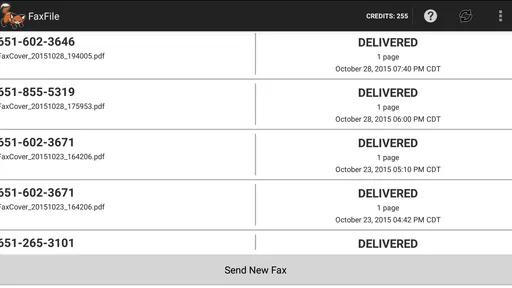
Our Review of FaxFile - Send Fax from phone
 Analysis by Appyee
Faxing from a phone sounds like the kind of task that should have disappeared years ago, yet many offices, landlords, clinics, schools, and public services still ask for a fax. FaxFile is built for that awkward situation: it turns an Android device into a practical way to send documents when the usual desktop machine is unavailable. I found its appeal less in flashy extras and more in removing a very specific obstacle—getting a PDF or Word document out quickly without finding a dedicated fax machine.
Developed by Actual Software Inc., this free business app is aimed at people who occasionally need to send paperwork rather than manage a full communications department. It supports common document types, including PDF and Word files, and is rated for Everyone. The app has been available since Apr 4, 2013, which gives it a long presence compared with many newer mobile tools. Its current average is 4.9 from around 16 thousand ratings, with more than 500 thousand installs, so it has clearly found a steady audience among people with this particular need.
How FaxFile feels when speed matters
I find the speed benefit most noticeable when the document is already digital and ready to go: the phone removes the detour of printing and scanning, but it cannot make a recipient’s fax line respond faster. This section looks at how to cut avoidable preparation time, and why a quick send still starts with checking the file and destination. A few small habits matter most when timing is tight.
Fast preparation depends more on the document than the phone
My first impression is that the useful part of the experience begins before transmission: locating the right file, checking that it opens correctly, and making sure the pages are in the intended order. For a short PDF already stored on the phone, the process feels naturally direct. There is no reason to print the document, scan it again, and then search for a fax machine. That reduction in handling is where the app saves the most time.
It is important to separate preparation speed from fax delivery speed. FaxFile can make the sending process convenient, but it cannot control the recipient’s line, availability, or the wider telephone network. A document that is ready immediately may still take longer to complete if the destination is busy or unreachable. I would therefore use it when I need a practical mobile route, not as a promise that every fax will arrive instantly.
A useful habit is to prepare the final file before opening the app. Rename confusing downloads, remove duplicate pages, and check whether the document is readable at normal zoom. This sounds basic, but it prevents the most frustrating kind of delay: sending quickly and then discovering that the wrong attachment or an incomplete scan was selected.
A realistic everyday scenario
Imagine receiving a lease amendment or insurance form by email while away from the office. The recipient requires a fax, but you only have your Android phone. With FaxFile, I would download the document, open it first to verify the contents, then pass it into the fax workflow rather than printing it at a shop. That is a realistic advantage for traveling workers, small businesses, and anyone handling paperwork from home.
The same workflow is less attractive if the source is a paper document. You would first need a clear digital copy, and the quality of that scan becomes important. A phone camera image with shadows, curled edges, or tiny text may technically be a file but still produce an unhelpful fax. In that case, a proper scanner or office multifunction machine may be the better starting point.
What happens during heavier use
FaxFile makes the most sense for occasional or moderate document sending. If I were handling several forms in one sitting, I would treat each file as a separate checkpoint: confirm the recipient, inspect the attachment, and keep track of which document has been submitted. Mobile convenience can encourage rushing, and repeated transmissions make a small selection mistake more costly.
For heavier office use, the question is not only whether the app can send files, but whether it fits the team’s record-keeping habits. A dedicated office fax service may be preferable when multiple employees need shared history, centralized billing, standardized cover pages, or administrative controls. FaxFile is more personal and immediate. That is a strength for an individual user, but it can become a limitation when a department needs a common workflow.
I also would not assume that sending a large batch is as effortless as sending a single short document. Larger files may take more time to prepare or transmit, and a phone is a less comfortable place to review a queue than a desktop system. The sensible approach is to split a demanding task into clearly labeled documents and verify progress instead of blindly repeating a send action.
Reliability, recovery, and the limits of mobile faxing
For an important fax, I think reliability means knowing what to do if the first attempt is uncertain, not assuming every mobile send will be effortless. I’ll focus on practical recovery steps and the factors outside the app that can affect delivery, including the recipient’s requirements. That perspective helps set a sensible boundary between convenient phone-based sending and workflows that need more control.
A straightforward tool is easier to recover from
The app’s focused purpose works in its favor. It is not trying to be a full office suite, a cloud drive, and a messaging platform at the same time. When a tool has one clear job, I find it easier to understand what needs checking before sending. That matters with faxing because the cost of an error is often practical rather than technical: a missed deadline, an unreadable page, or a document sent to the wrong number.
Still, a mobile fax should be treated like any other important submission. Keep the original file, note when you sent it, and retain any confirmation or status information the app provides during the process. If the recipient says nothing arrived, having the source document and a record of your attempt makes recovery much easier than starting from memory.
If a transmission does not complete, I would avoid immediately tapping send repeatedly. First check the destination number, confirm that the correct file is attached, and make sure the phone has a dependable internet connection. Then try again only after identifying the likely cause. Repeated attempts can create uncertainty about whether the recipient received one copy, several copies, or none.
Where reliability depends on the surrounding setup
FaxFile is only one part of the chain. The phone’s connection, the file itself, the recipient’s fax line, and any requirements imposed by the receiving organization all affect the outcome. A successful mobile workflow therefore starts with realistic expectations. If a clinic or office has strict instructions about cover pages, page orientation, or accepted formats, follow those instructions rather than assuming a technically valid file will satisfy every administrative requirement.
For sensitive paperwork, I would also think carefully about the environment in which the phone is used. A café, shared workspace, or borrowed device may be convenient, but it is not ideal for reviewing confidential documents. The app’s business category does not automatically make every surrounding situation private or controlled. The user still needs to choose a trustworthy device, connection, and file-handling routine.
File types are helpful, but conversion can still matter
Support for PDF and Word files covers many ordinary office situations. PDF is usually the safer choice when the layout must remain fixed, because it is less likely to change between devices. A Word document may be convenient when it is still being edited, but I would convert or export it to a final, stable format before sending whenever the recipient expects an exact page layout.
This is one of the less obvious decisions that can prevent trouble. A document that looks correct in an editor may not paginate exactly the same way elsewhere. If a signature line moves, a footer disappears, or a table breaks across pages, the fax may be delivered successfully while still failing its real purpose. Reviewing the final version on the phone is worth the extra moment.
Device constraints and practical phone habits
Because FaxFile runs on Android, the phone itself becomes part of the workflow. A small screen is adequate for a short form but less comfortable for checking a long contract. Limited storage can also make downloaded attachments harder to organize, especially when several versions have similar names. I recommend using descriptive filenames and deleting only temporary copies after confirming that the important original is stored safely elsewhere.
Battery and connectivity are practical considerations during any mobile transmission. I would avoid beginning an important send with a nearly empty battery or while moving through an unreliable connection. That is not a criticism unique to this app; it is simply the trade-off for replacing a fixed office machine with a portable device. The phone offers freedom, but the user has to provide the stable conditions that a dedicated office setup normally supplies.
Resource demands are difficult to judge from the app’s purpose alone, and I would not choose it expecting it to replace a complete document-management system. Its value is the narrow workflow: select a compatible file and send it from Android. If your needs involve editing long documents, organizing business archives, or coordinating many users, those jobs belong in other tools, with FaxFile used only for the final fax step.
Cost and the decision to use it regularly
The app itself is free to install, which makes it easy to keep available for an emergency. In-app purchases range from $2.99 to $49.99 per item, so frequent users should consider the likely cost of their own faxing pattern before making it part of a regular business process. Occasional users may value the convenience more than the expense of a single task, while high-volume users should compare the total with a conventional fax service or office plan.
This is also where the app differs from the usual alternatives. A physical fax machine requires hardware, paper, a phone connection, and maintenance. A copy shop adds travel and handling. An online fax service may offer broader account management and desktop integration. FaxFile sits between those options: more portable than hardware and more focused than a full business platform, but less suited to teams that need centralized administration.
Who should use it—and who should skip it
I would recommend FaxFile to an Android user who sends faxes occasionally, already has digital documents, and wants to avoid printing and scanning. It is especially practical for freelancers, home-based businesses, students dealing with formal paperwork, and travelers who cannot reach their normal office equipment. The strong user response, reflected in its 4.9 average, also suggests that its focused approach works well for many people.
I would look elsewhere if you need a shared company inbox, detailed document retention, frequent high-volume transmission, or a workflow built around desktop collaboration. I would also skip it for tasks where a scanned original, notarized paperwork, or a specialized secure process is required unless the receiving organization explicitly accepts a mobile fax. Convenience should not override the rules attached to important documents.
My performance verdict
FaxFile succeeds because it addresses a stubborn, narrow problem with a mobile-first workflow. It can make a short, already-digital document feel much less difficult to send, and it avoids the unnecessary print-scan cycle that often surrounds faxing. The experience is most convincing when the file is prepared, the destination is correct, and the phone has a stable connection.
Its limitations are equally clear: mobile screens are not ideal for reviewing large paperwork, transmission speed depends on more than the app, and repeated or team-based faxing may justify a more structured service. The purchase range also means “free app” should not be confused with unlimited cost-free faxing. I would keep it installed as a dependable emergency tool and use it regularly if my fax needs remained personal and moderate.
Overall, I see FaxFile as a practical business utility rather than a replacement for every office fax system. If you need to send a PDF or Word document from Android without access to a machine, it is a sensible option to try. Its real strength is reducing the number of physical steps between having a finished file and getting it to a fax recipient. Just prepare the document carefully, verify the result, and choose a dedicated alternative when your workflow grows beyond occasional mobile sending.
Verdict
Strengths of FaxFile - Send Fax from phone
- Send faxes directly from an Android or iPhone without a fax machine.
- Supports documents and images from your phone’s storage or camera.
- Useful for occasional faxing while traveling or working remotely.
- Delivery status helps confirm whether a fax was successfully sent.
- Simple interface makes basic fax transmission quick to set up.
Limitations of FaxFile - Send Fax from phone
- Fax pages require credits, which can become costly for frequent users.
- Pricing may be less convenient than a monthly fax subscription.
- Fax transmission depends on a stable internet connection.
- Some documents may need manual cropping or formatting before sending.
- Sensitive files are uploaded for processing, so privacy policies matter.
Other Releases by Actual Software Inc.
View All
FaxReceive - receive fax phone
Business4.4
Similar Picks in This Category
View All
LinkedIn: Community & Network
LinkedIn3.8

Zoom Workplace
zoom.com4.1

Microsoft Teams
Microsoft Corporation4.6

Meta Business Suite
Meta Platforms, Inc.4.6

Webex Meetings
Cisco Systems, Inc.4.5

TeamViewer Remote Control
TeamViewer4.4
Frequently Asked Questions
What is FaxFile - Send Fax from Phone, and how does it work?
FaxFile is a mobile faxing app that lets you send documents, photos, and other supported files from an Android or iOS device to a traditional fax number. After selecting a file, you enter the recipient’s fax number and submit the fax through the app. The service generally works through purchased fax credits rather than requiring a physical fax machine, phone line, or printer at home.
What types of documents and files can I send with FaxFile?
FaxFile is designed for common documents and image files, making it useful for forms, contracts, receipts, identification copies, and business paperwork. You can typically choose files stored on your phone or capture pages with the device camera, depending on the platform and available permissions. Before sending important paperwork, check that the pages are clear, correctly oriented, and in a supported format.
Does FaxFile require a subscription, or are there additional costs?
FaxFile commonly uses a credit-based payment system, so you purchase credits and spend them when sending faxes. The cost can vary according to the destination, number of pages, and applicable international rates. This may be convenient for occasional users, but frequent faxing can become more expensive than a monthly fax plan. Review the current in-app pricing before sending.
Can I send a fax internationally, and how long does delivery take?
The app supports faxing to many destinations, but availability, pricing, and delivery time can differ by country and recipient number. Most faxes are processed electronically, although transmission may take longer when the receiving line is busy, unavailable, or repeatedly fails to answer. FaxFile can provide transmission status or confirmation, but users should verify successful delivery when documents are time-sensitive.
Is FaxFile safe for sending private or confidential documents?
FaxFile may be practical for sending sensitive paperwork, but users should still consider privacy carefully before uploading documents. Use the official app store version, review its privacy policy, and avoid sending unnecessary personal information. Confirm the recipient’s fax number before transmission, keep any confirmation details, and remember that privacy also depends on the security practices of the receiving fax machine or office.
